Topology
All routers have a loopback address applied that matches their router name.
For Example R1 = 1.1.1.1/32
Interface IPs follow a consistent pattern: x.x.x.(Router Number). For example, on subnet 10.0.0.0/24 between R2 and R8, R2 uses 10.0.0.2/24 and R8 uses 10.0.0.8/24.
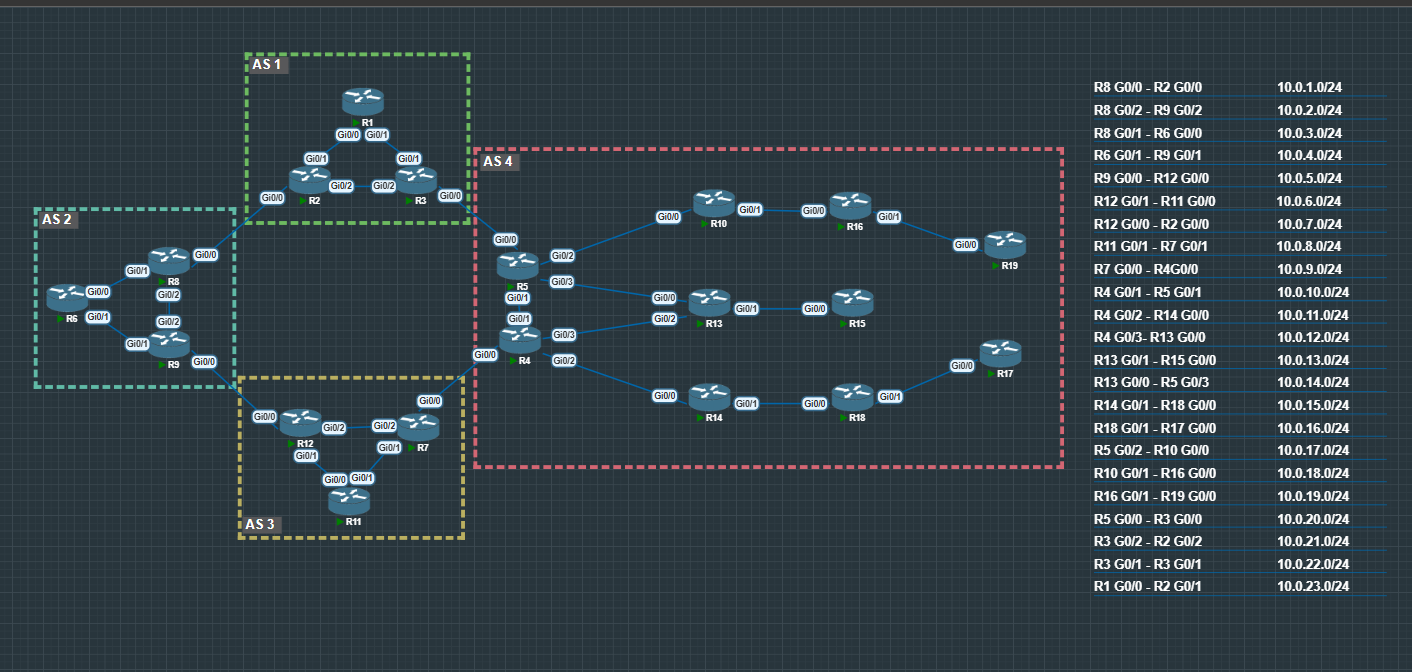
All Subnets and IGP Routing has been pre-configured.
BGP Foundations
eBGP Basic Setup
This is a simple eBGP setup using loopback-to-loopback peering, which is common in real networks for stability. By peering over loopbacks instead of physical interfaces, the BGP session stays up even if a single link or interface goes down, as long as there is still a valid path between the routers. Because eBGP neighbors are not directly connected when using loopbacks, a few extra steps are required.
Key Requirements
- A static route (or an IGP) so each router can reach the remote loopback
update-source loopbackso BGP uses the loopback addressebgp-multihopsince the neighbor is more than one hop away
Base Configuration Template
enable
conf t

ip route (remote loopback IP) (subnet mask) (next-hop IP)

router bgp (local AS)
 neighbor (remote loopback IP) remote-as (remote AS)
 neighbor (remote loopback IP) update-source loopback (loopback number)
 neighbor (remote loopback IP) ebgp-multihop
Example – R2
enable
conf t

ip route 8.8.8.8 255.255.255.255 10.0.1.8

router bgp 1
 neighbor 8.8.8.8 remote-as 2
 neighbor 8.8.8.8 update-source loopback 0
 neighbor 8.8.8.8 ebgp-multihop
Why Each Line Matters
- Static route – Allows reachability to the remote loopback before BGP establishes
- remote-as – Defines the eBGP relationship
- update-source loopback – Ensures BGP sources from the loopback address
- ebgp-multihop – Required because the neighbor is not directly connected
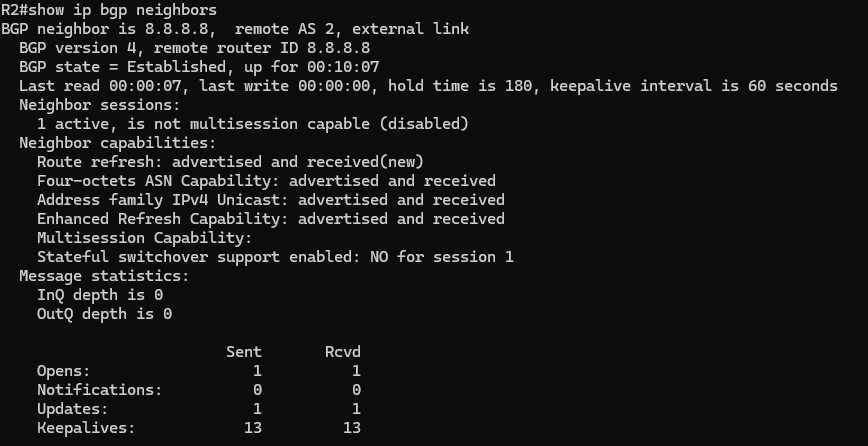
- Session is Established – The eBGP connection is up and stable
- Different AS numbers – Confirms this is an eBGP relationship
- Loopback neighbor address – Shows the session is built using loopbacks, not physical links
- Multihop connection – The routers are reaching each other across the network
- Routes being exchanged – Confirms BGP is actively doing its job
- Opens – Used when the BGP session first comes up to exchange basic information like AS numbers, router IDs, and timer values.
- Notifications – Sent if an error occurs (such as a mismatch or failure); receiving notifications usually results in the session being reset.
- Updates – Carry routing information, including new prefixes, changes, and withdrawals.
- Keepalives – Small, regular messages that keep the session alive and confirm the neighbor is still reachable.
iBGP Basic Setup
iBGP is used to exchange BGP routes within the same autonomous system. Neighbors in an iBGP relationship share the same AS number and commonly peer using loopback interfaces for stability.
Because iBGP neighbors are typically not directly connected, loopback-to-loopback peering is preferred. This keeps the session up as long as there is a valid path between routers.
Base Configuration Template
enable
conf t

router bgp (AS)
 neighbor (remote loopback IP) remote-as (AS)
 neighbor (remote loopback IP) update-source loopback (loopback number)
Example – R2
enable
conf t

router bgp 1
 neighbor 3.3.3.3 remote-as 1
 neighbor 3.3.3.3 update-source loopback 0
Verification
Below is the output of the show ip bgp neighbors command after successfully establishing an iBGP session. This confirms the neighbors are in an Established state and are communicating using loopback addresses.
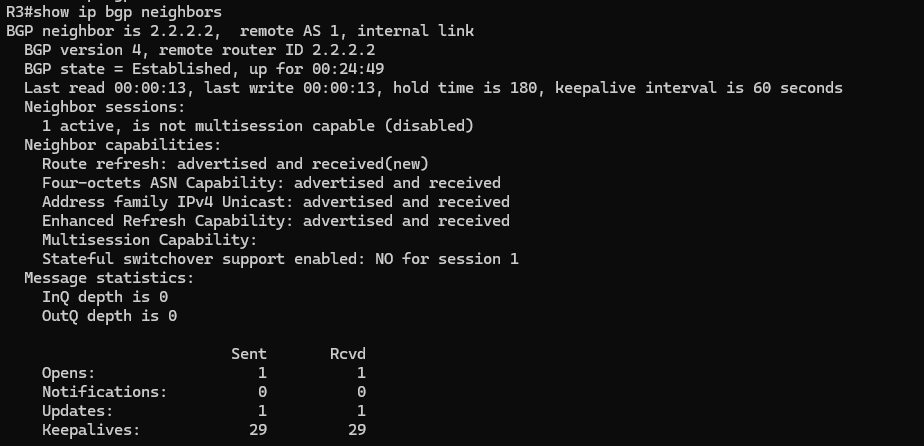
When looking at the show ip bgp neighbors output, here’s what stands out in an iBGP session:
- Remote AS matches the local AS – This confirms it is an internal BGP session.
- Internal link – The neighbor will be identified as an internal neighbor instead of external.
When you have lots of BGP neighbors, show ip bgp neighbors can be a mess.
Use this to see just the neighbors and their states:
show ip bgp neighbors | include (Neighbor is)|(State =)

Quickly shows which peers are up without scrolling through everything.
Advertising Networks in BGP
When running BGP, you don’t always want to advertise every route in your table. Cisco (and most vendors) let you specify exactly what networks to advertise using the network command:
network [network] mask [subnet]
This ensures only the routes you want are sent to your neighbors.
In this setup, we’ll keep things simple by redistributing our OSPF routes into BGP. This way, all the networks your router learns through OSPF, including connected networks and loopbacks, are automatically advertised to your BGP neighbors.
Example:
router bgp 1
  redistribute ospf 1
Once your BGP sessions are configured, you’ll want to quickly see which neighbors are up without scrolling through pages of configuration. The go-to command is:
show ip bgp summary
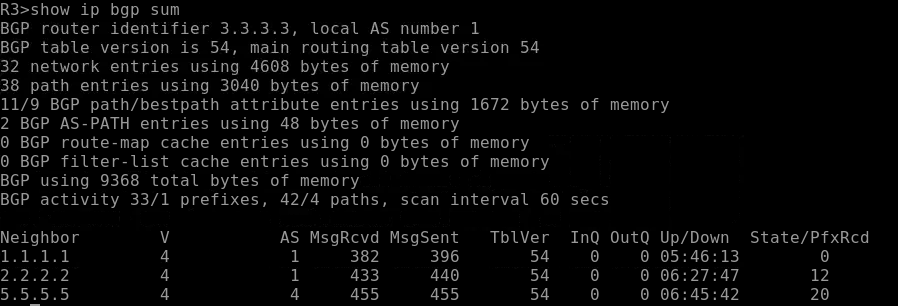
This shows:
- Neighbor IP addresses
- AS numbers
- BGP version
- Connection state (Idle/Active/Established)
- Number of prefixes received
It’s a fast way to check the health of your BGP peerings and see if your advertised networks are actually being shared.
Next-Hop Behavior from eBGP to iBGP and the Need for Next-Hop-Self
After setting up your basic eBGP and iBGP peerings, and telling the eBGP routers what networks you want to advertise, you might notice something frustrating: routes learned via BGP aren’t showing up in the routing table on some routers. This is a common gotcha, and the culprit is next-hop behavior between eBGP and iBGP.
Topology:
When a router learns a route from an external BGP neighbor, it keeps the external neighbor as the next-hop.
When that route is passed along to internal BGP peers, the router does not automatically change the next-hop.
So your internal routers receive the route, but they may not actually know how to reach that external next-hop address.
If the next hop isn’t reachable, the route will not install into the routing table.
The solution is to use next-hop-self on the iBGP session. This forces the router to replace the next hop with its own IP address, ensuring the route can install correctly in downstream iBGP routers:
- Without
next-hop-self: downstream routers may see routes that are unreachable, causing missing entries. - With
next-hop-self: all iBGP peers can reach the advertised next hop, and routes show up correctly.
Example:
router bgp 1
neighbor 3.3.3.3 next-hop-self
Apply this to all iBGP neighbor connections.
The iBGP Full-Mesh/Split-Horizon Problem
After configuring iBGP between your internal routers, you will start to notice a pattern: internal routers that are not directly peered with each an eBGP router will not learn all BGP routes.
This issue is known as the iBGP split-horizon rule.
Routes learned from one iBGP neighbor are not advertised to another iBGP neighbor. Unlike eBGP, iBGP does not modify the AS_PATH attribute inside the autonomous system, so it cannot rely on AS_PATH for loop prevention. To avoid routing loops, iBGP simply does not re-advertise routes learned from other iBGP peers.
What This Means in Practice
Looking at AS4 in our topology:
- R5 learns an external route (for example, from R3 in AS1 via eBGP).
- R5 advertises that route to R10 and R13 using iBGP.
Here’s the critical rule:
An iBGP router does not advertise routes learned from one iBGP peer to another iBGP peer.
So in this topology:
- R10 learns the route from R5 via iBGP.
- But R10 will NOT advertise that route to R16, even though R16 is connected to it.
- Likewise:
- R13 will not advertise the route to R15.
Those downstream routers (R16, R15, R19) would never learn the route unless they have a direct iBGP session with R5.
Why Full Mesh Becomes a Problem
In a full-mesh iBGP design, every router must peer with every other router inside the autonomous system.
The number of required iBGP sessions is calculated as: n(n − 1) / 2
Where n is the number of iBGP routers in the AS.
This means the growth is exponential-like in operational impact:
- 3 routers → 3 sessions
- 5 routers → 10 sessions
- 10 routers → 45 sessions
- 20 routers → 190 sessions
As routers are added, the number of BGP peerings increases rapidly. This results in:
- Increased configuration complexity
- Higher memory and CPU usage
- Greater operational overhead
- More difficult troubleshooting
The Solution: Scaling iBGP
To address this scaling problem, two mechanisms were introduced:
- Route Reflectors
- Confederations
These mechanisms allow routes to propagate throughout the AS without requiring every router to peer with every other router, eliminating the need for a full mesh while preserving proper route distribution.
iBGP Router Reflector
For the configuration of the iBGP Route Reflector, we’ll focus on the top section of AS4 in the diagram.
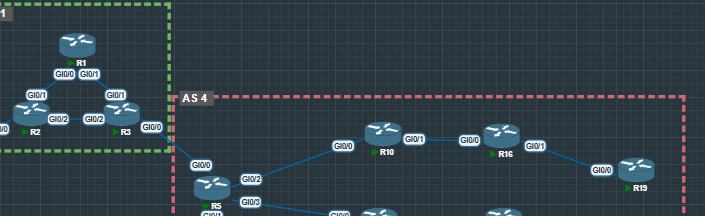
How Route Reflection Works
Normally:
iBGP routes learned from one iBGP neighbor are NOT advertised to another iBGP neighbor.
With a Route Reflector:
The RR is allowed to advertise iBGP-learned routes to its clients.
This is what makes scaling possible.
Example Configurations
R10 (Route Reflector)
R10 is acting as a Route Reflector for its clients:
enable
conf t
router bgp 4
bgp cluster-id 10.10.10.10
neighbor 16.16.16.16 route-reflector-client
Key points:
bgp cluster-ididentifies the reflection clusterroute-reflector-clientmarks that neighbor as a client- R10 can now reflect routes between its clients
R16
enable
conf t
router bgp 4
bgp cluster-id 16.16.16.16
neighbor 19.19.19.19 route-reflector-client
Here, R16 is acting as a Route Reflector for R19.
This creates another reflection point within AS4.
R5
enable
conf t
router bgp 4
bgp cluster-id 5.5.5.5
neighbor 10.10.10.10 route-reflector-client
R5 is reflecting routes toward R10 in this section of the topology.
Why This Matters
Without Route Reflectors:
- R5, R10, R16, and R19 would all need direct iBGP sessions with each other
- The number of sessions grows quickly
- Configuration and troubleshooting become painful
With Route Reflectors:
- Fewer iBGP sessions
- Controlled route reflection
- Scalable design
Big Picture
Route Reflectors allow you to:
- Break the full-mesh requirement
- Scale iBGP cleanly
- Ensure routes learned from one client reach other clients
In larger AS designs, Route Reflectors are not optional; they’re essential.
Loop Prevention in Route Reflector Designs
When you break the full-mesh rule, you introduce a new problem:
If routers are reflecting routes to each other, how do we prevent routing loops inside the same AS?
Route Reflectors solve this using two special attributes:
Originator ID
When a Route Reflector reflects a route, it attaches an Originator ID.
This value represents the router that originally injected the route into iBGP.
If a router sees a reflected route with its own Originator ID, it will drop it.
This prevents a route from looping back to the router that started it.
Cluster ID and Cluster List
Each Route Reflector has a cluster-id.
When a route is reflected, the RR adds its cluster ID to a cluster list inside the BGP update.
If another Route Reflector receives a route and sees its own cluster ID already in the cluster list, it rejects the route.
This prevents reflection loops between multiple Route Reflectors.
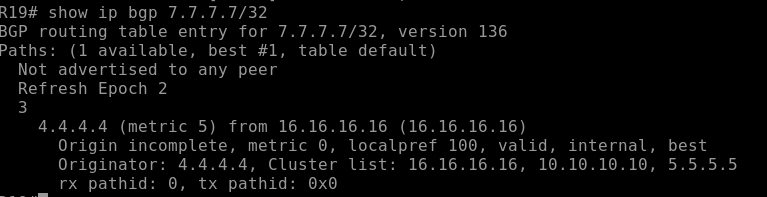
Once you have this down, repeat it for the routers 4, 14, 18, and 17.
iBGP Confederation: R13 and R15 Example
For routers R13 and R15, we’re using a BGP Confederation approach instead of Route Reflectors. While both methods solve iBGP scaling problems, confederations offer a slightly different trade-off that can be useful in certain designs.
Why Choose a Confederation?
- Stronger Policy Control: Confederations treat each internal sub-AS like eBGP when peering between sub-ASes. This allows more granular control over path selection, AS path prepending, and filtering between sub-ASes.
- Loop Prevention at the AS Level: Each sub-AS is tracked in the AS path. Loops can be detected across sub-ASes without relying on route reflection attributes like Cluster ID or Originator ID.
- Avoids Route Reflector Complexity: In networks with multiple RRs, you must manage clusters and client assignments. Confederations reduce that overhead by using normal BGP rules between sub-ASes.
In short, confederations are often preferred when you need more control over internal routing policies or when you want eBGP-like behavior inside a single AS without deploying multiple Route Reflectors.
Example Configuration
R13 (sub-AS 65444)
router bgp 65444
bgp confederation identifier 65000
bgp confederation peers 65445
neighbor 15.15.15.15 remote-as 65445
neighbor 15.15.15.15 update-source Loopback0
neighbor 15.15.15.15 ebgp-multihop 2
neighbor 5.5.5.5 remote-as 4
neighbor 5.5.5.5 update-source Loopback0
neighbor 5.5.5.5 next-hop-self
neighbor 4.4.4.4 remote-as 4
neighbor 4.4.4.4 update-source Loopback0
neighbor 4.4.4.4 next-hop-self
redistribute ospf 1
R15 (sub-AS 65445)
router bgp 65445
bgp confederation identifier 65000
bgp confederation peers 65444
neighbor 13.13.13.13 remote-as 65444
neighbor 13.13.13.13 update-source Loopback0
neighbor 13.13.13.13 ebgp-multihop 2
redistribute ospf 1
External AS Peers (R4 and R5)
R4:
router bgp 4
neighbor 13.13.13.13 remote-as 65444
neighbor 13.13.13.13 update-source Loopback0
neighbor 13.13.13.13 next-hop-self

R5:
router bgp 4
neighbor 13.13.13.13 remote-as 65444
neighbor 13.13.13.13 update-source Loopback0
neighbor 13.13.13.13 next-hop-self
Show ip bgp R13

Key Points to Notice:
*> – marks the best path selected by BGP for each prefix.
15.15.15.15/32 – learned via iBGP from R15 (sub-AS 65445), AS Path shows (65445).
16.16.16.16/32 – learned from eBGP peers, AS Path reflects the external AS.
Next Hop – IP of the neighbor from which the route was learned. next-hop-self ensures iBGP peers see R13 as the next hop.
Confirms that OSPF-redistributed networks are appearing in the BGP table.
Show ip bgp R5

Key Points to Notice
*>– best path selected by BGP for each network.15.15.15.15/32– learned via eBGP from R13 (sub-AS 65444).- AS Path shows
?for internal confederation routes because R5 is external. - Next Hop – shows the IP address of the router to reach this network, confirming connectivity.
- Confirms proper iBGP → eBGP propagation and that sub-AS routes are correctly advertised.
Key Takeaways
- Confederations divide a large AS into smaller sub-ASes internally, simplifying iBGP scaling while still appearing as a single AS externally.
- They give you fine-grained policy control and loop prevention at the sub-AS level.
- Compared to Route Reflectors, confederations reduce the need to manage RR clusters and client relationships.
- Use confederations when you want eBGP-like behavior internally or need more policy flexibility than RRs provide.
Path Shaping – N WILLA OMI
N WLLA OMNI is a quick way to remember the BGP best path selection process.
When a router has multiple routes to the same NLRI (Network Layer Reachability Information), it walks this list top to bottom.
The first difference wins.
The Decision Process
N – Next Hop Reachable
If the next hop isn’t in the routing table, the path is rejected.
W – Weight (Highest Wins)
Cisco-only. Local to the router. Not advertised.
L – Local Preference (Highest Wins)
Shared inside the AS. Primary outbound path control tool.
L – Locally Originated
Network, aggregate, or redistributed routes are preferred.
A – AS Path (Shortest Wins)
Fewer AS hops are better. This is where prepending works.
O – Origin (Lowest Wins)
IGP > EGP > Incomplete.
M – MED (Lowest Wins)
Used between directly connected ASes with multiple links.
N – Neighbor Type
eBGP preferred over iBGP.
I – IGP Metric (Lowest Wins)
Lower internal cost to reach the next hop wins.
Tie-Breakers (If Still Equal)
Oldest eBGP path wins
Lowest Router ID
Lowest Neighbor IP
Key Takeaway
Path shaping works because you are intentionally manipulating one of these steps.
If something higher in the list differs, anything below it won’t matter.
Weight vs Local-Pref
When BGP has multiple valid paths to the same destination, it must decide which one to install in the routing table. Two of the earliest (and most powerful) decision factors in Cisco’s BGP best-path algorithm are:
- Weight
- Local Preference (Local-Pref)
Even though they sound similar, they operate very differently.
What is Weight?
Weight is a Cisco-proprietary attribute used to influence outbound path selection on a single router only.
- Range:
0 – 65,535. - Default:
32768for routes locally originated0for all other routes
- Higher is better
- Not advertised to neighbors
Weight never leaves the router where it is configured.
That means:
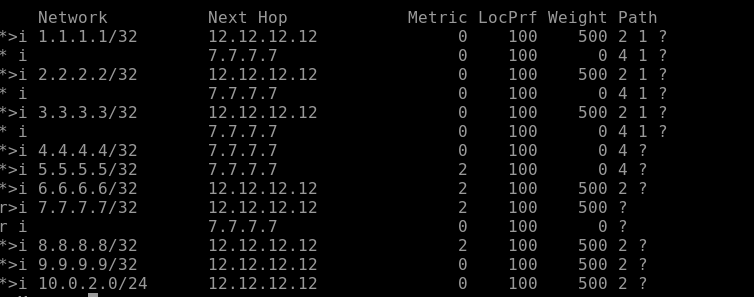
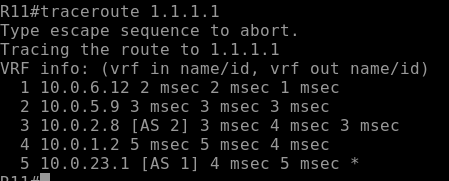
If you set a higher weight on R11 for a route learned from R12, only R11 will prefer that path. The rest of the AS will not know about this decision.
Example
route-map PREFER-R12 permit 10
set weight 500

router bgp 3
neighbor 12.12.12.12 route-map PREFER-R12 in
Result:
- R11 prefers routes from R12.
- Other routers in AS 3 are unaffected.
show ip bgp
Traceoute:
What is Local Preference?
Local Preference (Local-Pref) is a well-known discretionary BGP attribute used to influence outbound path selection across the entire AS.
- Default:
100 - Higher is better
- Advertised to all iBGP peers
- Not sent to eBGP peers
Local Preference tells your entire AS:
“If you see this route, prefer this exit point.”
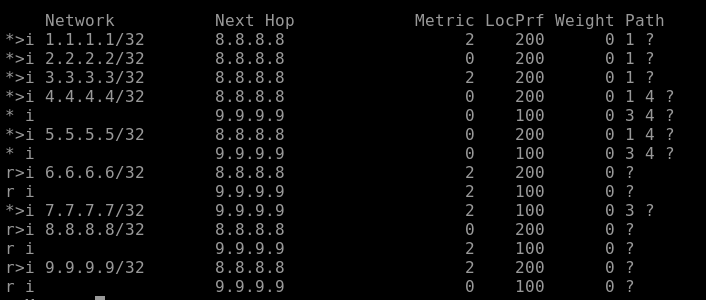
Example
route-map PREFER-R8 permit 10
set local-preference 200

router bgp 2
neighbor 8.8.8.8 route-map PREFER-R8 in
Result:
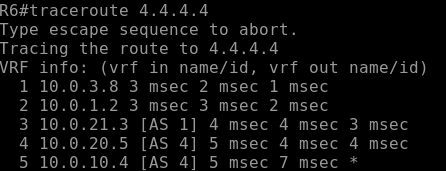
- R6 prefers R8’s path.
- R6 advertises a higher Local-Pref to all iBGP neighbors.
- All routers inside AS 2 now prefer exiting via R8.
R6 show ip bgp
Traceroute:
Key Differences
| Attribute | Weight | Local Preference |
|---|---|---|
| Scope | Single router only | Entire AS |
| Propagated? | No | Yes (within iBGP) |
| Default Value | 0 (32768 if local) | 100 |
| Higher or Lower? | Higher is preferred | Higher is preferred |
| Standard? | Cisco proprietary | Standard BGP attribute |
AS-Path prepending
After controlling outbound traffic with Weight and Local Preference, the next question is:
How do we influence inbound traffic?
That’s where AS-Path Prepending comes in.
What is AS-Path Prepending?
AS-Path Prepending is a BGP technique where you artificially lengthen your AS path when advertising routes to a specific neighbor.
Since one of BGP’s best-path rules is:
Prefer the path with the shortest AS Path
By making your path look longer, you make it less attractive to external networks.
Why Use AS-Path Prepending?
You use AS-Path prepending to:
- Influence how other autonomous systems send traffic to you
- Shift inbound traffic away from one ISP and toward another
- Create backup or secondary link behavior
Important:
- This only affects external BGP neighbors
- It does not influence path selection inside your AS (Local Preference handles that)
Example Scenario
Your AS 1 connects to:
- ISP-A via R2
- ISP-B via R3
You want ISP-A to be the preferred inbound path, and ISP-B to act as backup.
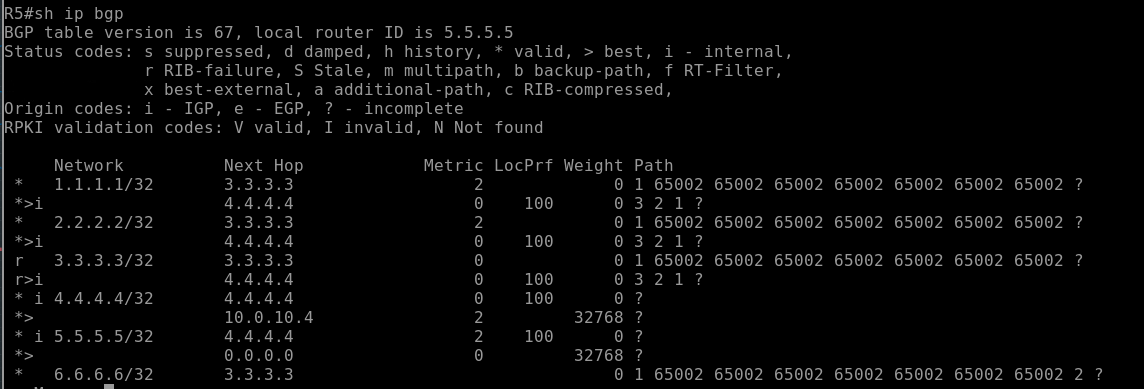
On the ISP-B-facing router, you prepend your AS multiple times:
route-map PREPEND-ISP-B permit 10
set as-path prepend 65002 65002 65002 65002 65002 65002 65002

router bgp 1
neighbor 5.5.5.5 route-map PREPEND-ISP-B out
Now, instead of advertising:
1
You advertise:
1 65002 65002 65002 65002 65002 65002 65002
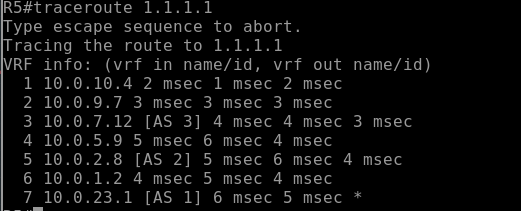
To the outside world, that path looks longer and therefore less desirable.
Result:
R5
MED (Multi-Exit Discriminator) Comparison
After understanding Weight, Local Preference, and AS-Path Prepending, the next attribute in the BGP decision process is:
MED is used to influence how a neighboring AS sends traffic into your AS when multiple entry points exist.
What is MED?
MED is a non-transitive BGP attribute that suggests to an external neighbor:
“If you’re going to send traffic to me, prefer this link.”
Unlike Weight and Local Preference:
- Lower MED is preferred
- It is sent to eBGP neighbors
- It is typically compared only when routes come from the same AS
Default value (Cisco):
0if not set
When is MED Used?
MED matters when:
- Two autonomous systems connect at multiple points
- The same prefix is advertised from multiple links
- The receiving AS must choose which entry point to use
Enterprise design discussion
Now that we’ve covered:
- Weight
- Local Preference
- AS-Path Prepending
- MED
Let’s zoom out and talk about how this actually applies in an enterprise network design.
Because knowing the attributes is one thing.
Designing with them intentionally is another.
The Reality of Enterprise BGP
Most enterprise networks are:
- Dual-homed to two different ISPs
- Using private AS numbers
- Not trying to influence global internet routing in complex ways
- Focused on stability and predictability
Your main goals are usually:
- Primary/backup internet
- Load sharing (if supported)
- Deterministic failover
- Simple, explainable policy
Outbound Traffic Control (Leaving Your AS)
Outbound traffic is the part you fully control.
The best enterprise practice:
Use Local Preference
Why?
- It affects the entire AS
- It is consistent
- It works cleanly with Route Reflectors or Confederations
- It scales
Example strategy:
- ISP-A → Local Pref 200 (Primary)
- ISP-B → Local Pref 100 (Backup)
This guarantees all routers inside your AS prefer ISP-A unless it fails.
Avoid relying on Weight in production designs because:
- It only affects one router
- It creates inconsistent path decisions
- It does not scale
Weight is fine for testing.
Local Preference is for design.
Inbound Traffic Control (Coming Into Your AS)
Inbound is harder because:
You do not control remote AS policy.
Enterprise-friendly tools:
1. AS-Path Prepending
- Simple
- Standards-based
- Works across different providers
Used for:
- Making one ISP less attractive
- Encouraging primary/backup behavior
But remember:
It is a suggestion, not a guarantee.
2. Provider-Specific Communities (If Available)
Some ISPs allow:
- Community strings to manipulate their Local Preference
- Regional preference control
- Traffic engineering options
This is often more effective than pure AS-Path prepending.
Where MED Fits (In Enterprise)
In most enterprise dual-ISP designs:
- MED is not very useful
- ISPs rarely compare your MED across different providers
- It only works predictably when dual-homed to the same ISP
So, ina typical enterprise internet edge:
MED is usually irrelevant.
Recommended Enterprise Path Selection Order
For a clean, predictable design:
Outbound Strategy
- Use Local Preference
- Keep it simple (Primary = 200, Backup = 100)
- Avoid overly complex route maps
Inbound Strategy
- Use light AS-Path Prepending if Communities are an option
- Avoid excessive prepends
- Document the intent clearly
Failover Philosophy
Enterprise design should prioritize:
- Deterministic behavior
- Fast convergence
- Clear policy visibility
If someone looks at your config six months later, they should instantly understand:
- Which link is primary
- Which link is the backup
- Why
If the answer requires reading 12 route-maps and 5 prefix-lists:
It’s over-engineered.
Scaling Considerations
As enterprises grow:
- Add Route Reflectors for iBGP scalability
- Standardize Local Preference policies
- Avoid per-router Weight manipulation
- Use consistent community tagging
Policy should become centralized and intentional, not reactive.
Design Takeaway
In enterprise BGP:
- Local Preference is your primary outbound control tool
- AS-Path Prepending is your basic inbound influence tool
- MED is situational
- Weight is for testing or temporary overrides
The goal is not to use every BGP attribute.
The goal is to build a network that behaves predictably during failure.
Simple policies win.
Policy, Filtering & Security
Peer-groups / templates
As BGP deployments grow, repeating the same neighbor configuration over and over becomes inefficient and error-prone.
That’s where peer-groups (Cisco) and templates (modern implementations) come in.
They allow you to apply common settings to multiple neighbors at once.
Why Use Peer-Groups?
Without peer-groups:
- Every neighbor requires identical commands typed manually
- Policy changes must be updated neighbor-by-neighbor
- Risk of configuration drift increases
With peer-groups:
- The shared policy is defined once
- All assigned neighbors inherit the configuration
- Changes scale cleanly
Basic Peer-Group Example
router bgp 1
neighbor IBGP-PEERS peer-group
neighbor IBGP-PEERS remote-as 1
neighbor IBGP-PEERS update-source Loopback0
neighbor IBGP-PEERS next-hop-self

neighbor 10.0.23.2 peer-group IBGP-PEERS
neighbor 10.0.22.3 peer-group IBGP-PEERS
Now both neighbors:
- Share the same remote AS
- Use Loopback0
- Apply next-hop-self
One change to the peer-group affects all members.
Templates (Modern Approach)
Newer IOS versions use neighbor templates, which are more flexible.
Example:
router bgp 1
template peer-policy IBGP-POLICY
next-hop-self
route-reflector-client

template peer-session IBGP-SESSION
remote-as 1
update-source Loopback0

neighbor 10.0.23.2 inherit peer-session IBGP-SESSION
neighbor 10.0.22.3 inherit peer-policy IBGP-POLICY
This separates:
- Session settings (transport-level)
- Policy settings (routing behavior)
More modular. More scalable.
When They Matter Most
Peer-groups/templates are critical when:
- You have many iBGP neighbors
- You are using Route Reflectors
- You are deploying BGP in data center or ISP environments
- You want clean, standardized configs
In enterprise networks with only two ISPs, it may not be necessary.
In larger designs, it becomes essential.
Design Takeaway
Peer-groups and templates:
- Improve scalability
- Reduce human error
- Standardize policy
- Simplify troubleshooting
They don’t change how BGP selects paths.
They change how cleanly you manage BGP at scale.
Prefix filtering
Prefix filtering is one of the most important security and stability practices in BGP.
At its core, prefix filtering controls:
Which routes you accept and which routes you advertise.
Without filtering, you risk:
- Accepting incorrect or malicious routes
- Accidentally advertising internal networks
- Causing route leaks
- Impacting global routing stability
Why Prefix Filtering Matters
BGP is built on trust.
If you accept everything from a neighbor, you are trusting them completely.
If you advertise everything, you may expose routes that should never leave your AS.
Good design always includes:
- Inbound filtering (what you accept)
- Outbound filtering (what you send)
Inbound Prefix Filtering
Used to control what routes you learn.
Common enterprise practice:
- Only accept a default route from the ISP
- Or only accept specific public prefixes
Example:
ip prefix-list DEFAULT-ONLY permit 0.0.0.0/0

router bgp 1
neighbor 5.5.5.5 prefix-list DEFAULT-ONLY in
This ensures you only learn the default route — nothing else.
Outbound Prefix Filtering
Used to control what routes you advertise.
Enterprise best practice:
- Only advertise your own public IP space
- Never advertise internal RFC1918 networks
- Never leak full routing tables to upstream providers
Example:
ip prefix-list OUR-PUBLIC permit 198.51.100.50/32

router bgp 1
neighbor 5.5.5.5 prefix-list OUR-PUBLIC out
This ensures only your owned prefix is advertised.
Maximum-Prefix Protection
Another protective measure:
neighbor 5.5.5.5 maximum-prefix 100
If a neighbor suddenly sends more than 100 routes:
- The session can be shut down
- Prevents accidental full-table leaks
This protects your router resources.
Enterprise Best Practice
At a minimum:
- Filter inbound routes
- Filter outbound routes
- Use maximum-prefix limits
- Explicitly define what is allowed (deny everything else)
Never rely on default behavior.
Design Takeaway
Prefix filtering is not optional in production BGP.
It is:
- A security control
- A stability control
- A professional best practice
Path shaping determines which path is preferred.
Prefix filtering determines which routes are allowed to exist at all.
AS-path filtering
While prefix filtering controls what networks are allowed,
AS-path filtering controls who those networks came from.
It allows you to make routing decisions based on the AS_PATH attribute.
Why Use AS-Path Filtering?
AS-path filtering is useful when you want to:
- Block routes transiting through certain ASes
- Prevent accepting your own AS (loop protection)
- Stop routes from specific providers
- Enforce routing policy based on upstream carriers
It gives you control based on routing history, not just the prefix itself.
Basic Example
AS-path filtering is typically done using:
ip as-path access-list.- Applied via route-map
Example:
ip as-path access-list 10 deny 65002
ip as-path access-list 10 permit .*

route-map FILTER-AS permit 10
match as-path 10

router bgp 1
neighbor 5.5.5.5 route-map FILTER-AS in
This denies any route that contains AS 65002 anywhere in the path.
The underscores (_) ensure exact AS matching.
Preventing Your Own AS from Reappearing
Although BGP has built-in loop prevention, you can explicitly filter:
ip as-path access-list 20 deny 1
ip as-path access-list 20 permit .*
This drops any route containing your own AS in the path.
Enterprise Use Cases
In enterprise networks, AS-path filtering is commonly used to:
- Prevent accepting routes from undesirable transit providers
- Enforce “no transit” policies
- Ensure backup ISP paths behave as expected
- Add additional route validation controls
It is especially useful when combined with:
- Prefix filtering
- Local Preference manipulation
- Community tagging
Important Notes
- AS-path filtering uses regular expressions.
- Order matters.
- Always include a final permit statement if you don’t want to block everything.
Improper AS-path filters can accidentally drop valid routes.
Design Takeaway
- Prefix filtering = controls what networks
- AS-path filtering = controls where they came from
Used together, they provide strong policy enforcement and reduce the risk of unintended routing behavior.
Communities for policy
BGP communities are a flexible way to tag routes and influence routing decisions, both inside and outside your AS.
They allow you to implement routing policies without changing prefixes or AS paths.
What is a BGP Community?
- A 32-bit value attached to a route
- Can be well-known or private
- Used by routers to apply policies automatically
- Can affect Local Preference, route acceptance, or route advertisement
Why Use Communities?
Communities allow you to:
- Mark routes for preferred exit points
- Signal backup routes to peers
- Control route propagation to other neighbors
- Simplify policy changes across many routes
They are particularly powerful in multi-homed enterprise or ISP environments.
Example: Tagging Routes for Local Preference
Suppose you want ISP-B to prefer certain routes:
ip community-list 10 permit 1:100
route-map SET-LOCAL-PREF permit 10
match community 10
set local-preference 200

router bgp 1
neighbor 5.5.5.5 route-map SET-LOCAL-PREF in
Routes tagged with 1:100 get a higher local preference.
Example: Controlling Route Export
ip community-list 20 permit 1:200
route-map BLOCK-EXPORT permit 10
match community 20
set community no-export

router bgp 1
neighbor 5.5.5.5 route-map BLOCK-EXPORT out
- Routes with
1:200will not be advertised beyond the immediate neighbor - Useful for controlling transit in multi-AS environments
Design Takeaway
Communities are the “tags” of BGP:
- They simplify policy enforcement
- They reduce repetitive configuration
- They allow predictable behavior across multiple peers and ISPs
When combined with Local Preference, AS-path, and prefix filters, communities become a central tool in enterprise BGP policy design.
TTL security
TTL Security is a simple but effective way to protect BGP sessions from certain attacks.
It works by ensuring BGP packets come from directly connected or expected neighbors.
How TTL Security Works
- BGP packets are sent with a Time-To-Live (TTL) value.
- Normally, TTL decrements with each hop.
- With TTL security, the router expects BGP packets to arrive with a TTL high enough to indicate they are only 1 or 2 hops away.
- If the TTL is too low, the packet is dropped.
This protects against:
- Remote attacks attempting to inject BGP routes
- Spoofed BGP sessions from non-direct neighbors
Example
router bgp 1
neighbor 5.5.5.5 remote-as 4
neighbor 5.5.5.5 ttl-security hops 2
ttl-security hops 2allows only BGP packets from neighbors up to 2 hops away.- Packets arriving with TTL lower than expected are discarded.
Best Practices
-
Always enable TTL security for eBGP and iBGP sessions over untrusted networks.
-
Combine with:
- Prefix filtering
- AS-path filtering
- Peer authentication (MD5)
-
TTL security is lightweight and low overhead, but very effective for session hardening.
Design Takeaway
TTL security is a simple measure that prevents spoofed or distant BGP sessions.
In enterprise and ISP networks, it’s part of a defense-in-depth strategy for securing BGP.
Peer Authentication
BGP peer authentication is a critical security measure to ensure that only trusted neighbors can establish a BGP session.
Without it, anyone who can reach your BGP port (TCP 179) could attempt to inject routes into your network.
How Peer Authentication Works
- Hashing on the TCP session.
- Both neighbors must configure the same password.
- If the password doesn’t match, the session will not come up.
This protects against:
- Unauthorized BGP session establishment
- Accidental or malicious route injection
- Session hijacking attempts
Example – MD5 Authentication (Legacy)
router bgp 1
neighbor 5.5.5.5 remote-as 4
neighbor 5.5.5.5 password BGPSecret123
- Both sides must use
BGPSecret123. - The password is hashed in transit, not sent in cleartext.
Example – SHA-256 Authentication (Modern)
Some modern BGP implementations support SHA-based authentication:
key chain BGP-KEYS tcp
 key 1
  cryptographic-algorithm hmac-sha-256
  key-string 68e00c8130947f65f46611ba33f8c72d64dce69466515035e4e6f427630c3491

router bgp 1
 neighbor 5.5.5.5 remote-as 4
 neighbor 5.5.5.5 keychain BGP-KEYS
- Uses SHA-256 instead of MD5 for stronger hashing.
- Both sides must match the password and hash type.
- Provides improved security over legacy MD5 authentication.
Best Practices
-
Use SHA-256, unique passwords for each BGP neighbor.
-
Combine peer authentication with:
- Prefix filtering
- AS-path filtering
- TTL security
-
Rotate passwords periodically if possible.
-
Document all neighbor passwords securely.
Design Takeaway
Peer authentication ensures that only authorized routers participate in your BGP topology.
It’s a must-have for production BGP environments, especially over untrusted links or the internet.
(Conceptual) RPKI
RPKI (Resource Public Key Infrastructure) is a security framework designed to protect BGP routing from route hijacking and mis-announcements.
It allows network operators to cryptographically verify that an AS is authorized to announce a particular IP prefix.
How RPKI Works Conceptually
-
Resource Certificates
- The Regional Internet Registry (RIR) issues a digital certificate to an AS for the IP prefixes it owns.
-
Route Origin Authorizations (ROAs)
- The certificate is used to create an ROA**, specifying which AS is allowed to announce a given prefix.
-
Validation
- Routers or BGP speakers can check incoming routes against ROAs.
- If the AS is not authorized for the prefix, the route can be rejected or deprioritized.
Why It Matters
Without RPKI:
- Any AS can accidentally or maliciously announce someone else’s prefix.
- This can cause traffic hijacks, outages, or interception.
With RPKI:
- Only authorized ASes are allowed to originate routes.
- Enhances routing security and trustworthiness.
Conceptual Example
- Your AS: 65000
- Your prefix: 198.51.100.0/24
- ROA: Authorizes AS 65000 to announce 198.51.100.0/24
If an attacker from AS 65200 announces the same prefix:
- Validation fails
- The route can be rejected by compliant BGP speakers
Design Takeaway
RPKI is about proactive validation, not reactive filtering.
It complements:
- Prefix filtering
- AS-path filtering
- Communities
It adds cryptographic trust to BGP, making internet routing safer and more predictable.
Conclusion
In conclusion, BGP can seem complicated at first, but it’s really just about making sure your networks talk to each other reliably, and the traffic goes where you want it to. In this lab, we went through setting up eBGP and iBGP, handling next-hop issues, and dealing with the iBGP full-mesh problem using Route Reflectors and Confederations. Each step helps your network stay stable and scalable.
We also covered the main BGP attributes Weight, Local Preference, AS-Path Prepending, and MED, and how they affect traffic. Weight is for a single router, Local Pref affects the whole AS, AS-Path Prepending helps control inbound traffic, and MED can guide neighbors on which link to use. Knowing how these work means you can control both incoming and outgoing traffic instead of just hoping it works.
Overall, understanding BGP lets you set up networks that are reliable, scalable, and easy to manage. Once you get the basics down, you can handle bigger networks, multiple ISPs, and more advanced routing setups without things falling apart.